
How Home Depot penny items actually work
A first-time reader's guide: how to spot them, how to verify them, and why they exist at all.
Quick answer
Penny items are real. They are products Home Depot meant to pull from the sales floor but missed, and they still ring up for $0.01. Your job: stack the signals, then scan the barcode on the package (its UPC) at self-checkout to prove the price.
Beginner method
Stack 2-3 signals on one item: clearance tags, strange app messages, older packaging, or stock sitting where it does not belong. Take one item to self-checkout and scan the package UPC. If it rings for $0.01, buy that one first. If it rings for any other price, put it back.
Do not ask an associate whether a suspected penny item is a penny. Once staff identify a penny item, their job is usually to remove it from the floor.
Penny shopping feels confusing at first for one simple reason: the $0.01 price is real, but it is not a deal the store is offering you. The store is trying to remove those items — you are trying to find them first.
This guide starts with the moves that matter most. Then it goes deeper into tags, app signals, the handheld device staff carry, the high overhead shelves, stop-sales, and employee rules. Read the quick method first. Come back to the deeper topics when a store trip raises a specific question.
Start here: the quick version
New here? These six questions give you the method in under a minute. The rest of the guide goes deeper on each one.
WHO can buy a penny item?
Quick answer: Almost anyone. You can.
- The only people who can't buy them are store employees. That holds on the clock and off the clock — and it covers their family and friends too.
WHAT is a penny item?
- A penny item is a product that rings up for $0.01.
- It is not an advertised deal. It is a missed pull: the store meant to remove it but did not.
WHEN can you find them?
- Any day the store is open — 7 days a week, all year.
WHERE are they?
- The Home Depot. Anywhere in the store, in any aisle.
- They're not kept in one clearance corner anymore — they sit on the normal shelf, mixed in with full-price stock. (More below.)
WHY do penny items exist?
Quick answer: Two things happen at once — the store misses an item, and a shopper who knows the signs catches it.
- Staff miss a few. Workers are told to pull penny items off the floor. But stores are busy, and some items get missed. Those can still ring for $0.01.
- You catch what they missed. You know the signs, so you test the right item.
HOW do you find them?
Short version: Stack a few signals, then scan one item to see what it rings.
- Stack 2-3 signals on the same item. One signal is never enough: the shelf looks wrong, a clearance sticker is nearby, or the app shows a strange status.
- Watch the date on the tag, not the price ending. Endings like .06 or .03 used to read like a calendar. In 2026 they're not reliable. The date and the "WAS" price tell you more.
- Scan to prove it. Take ONE item to self-checkout. Scan the barcode on the package (the product's own UPC), not the barcode on the yellow tag.
- Read the register. Rings up at $0.01 → it's a penny: buy that one, finish the sale, then quietly go back for the rest. Any other price → put it back.
- Never ask staff about a penny you think you found. Once staff spot a penny, their job is to pull it. (Asking for help finding regular clearance is fine. One exception: an item you physically cannot reach — see The exception: when you can't reach it.)
That's the whole method. The rest of this guide gives you the proof, warnings, and weird cases. Verified a penny today? Report your find so the next shopper's list gets sharper.
Penny items, plainly explained
If you are new, use this definition:
"Penny items are not advertised deals. They are items Home Depot intended to pull from the floor, but some get missed and will scan for $0.01."
Three parts matter before you start looking:
The price is real. When the product UPC scans at the register, the system returns $0.01.
The sale is unintended. The store is not promoting the item. It is trying to remove it.
The opportunity comes from missed execution. Items get misplaced, lost in the store's count, stuck on the high shelves, or simply forgotten.
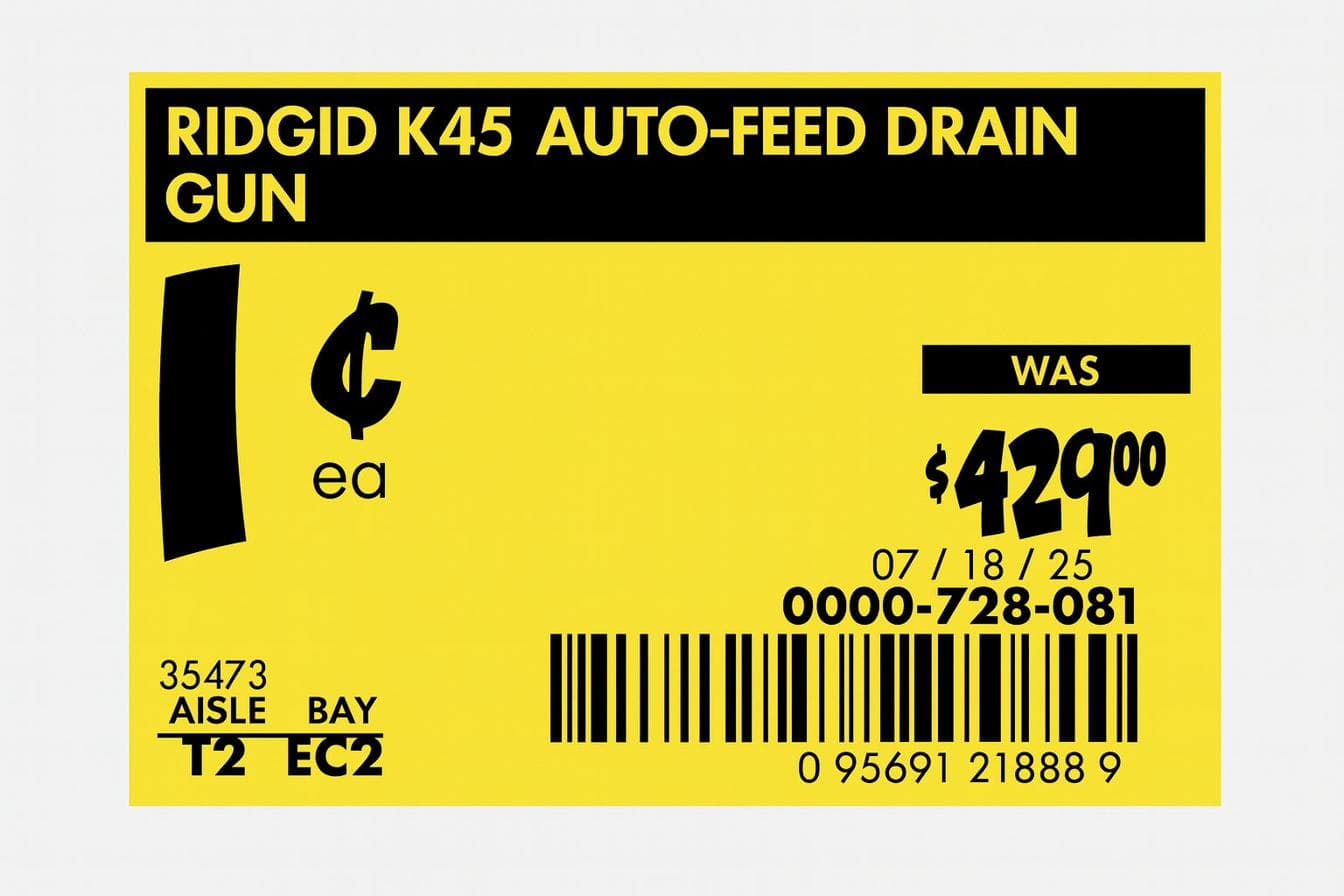
Experienced penny shoppers call a find like this a "holy grail": a high-value item that dropped to $0.01 and was missed. You will not see one most trips. When you do, the rest of this guide helps you decide whether to trust the price.
Why prices change store by store
Penny pricing is not uniform. It is not a corporate-wide sale, and it does not work the same way at every location.
The same item can be a penny at one store, full price three miles away, and 50% off at another store nearby. It may penny out (drop to $0.01) everywhere later, or it may not.
Whether a found penny item gets sold also varies. Store training, manager judgment, the cashier, the shift, and the moment at the register can all affect what happens.
Home Depot's policy as of May 2026 does say that penny items reaching a point of sale should be sold. But training differs store by store, so no universal rule is followed.
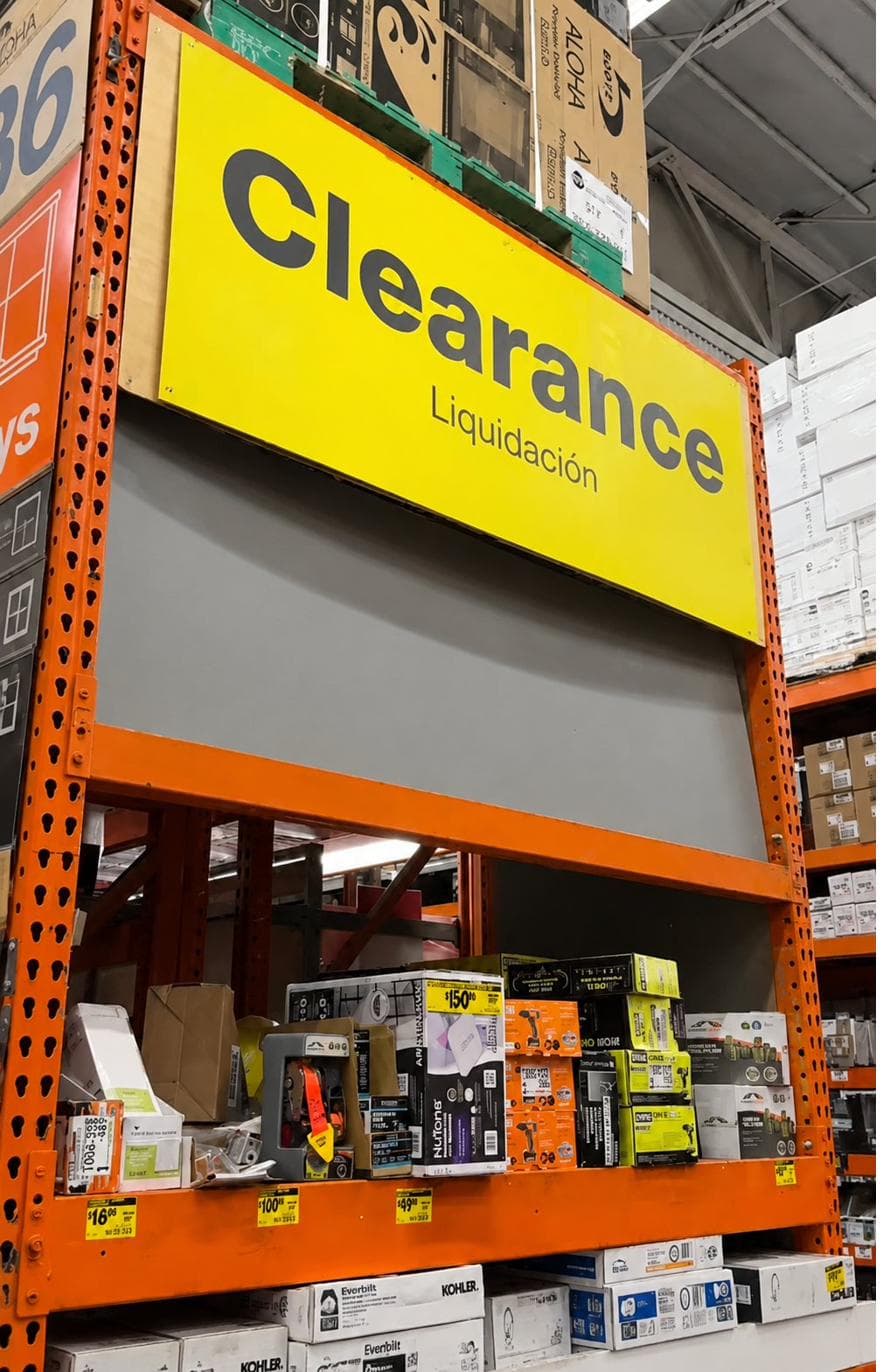
Why clearance is harder to spot now
Home Depot has been changing where many clearance items live in the store.
Older clearance setups often used central endcaps — display shelves at the end of an aisle. Those endcaps made clearance easier to browse and cleared shelf space for new product. Many stores have now phased them out.
In those stores, clearance often stays in the normal shelf spot and runs through its markdown cycle beside full-price items.
Signals worth testing
Penny items rarely look obvious. Even the Ridgid drain gun earlier — the cleanest example you will see — matters because of what its tag says, not because the tag is yellow. Most finds are normal-looking merchandise with one or two details that do not fit. Stack these signals before you test an item:
- The shelf looks wrong. The item is not in its normal shelf spot, or there are very few of it where there should be many.
- There's a clearance sticker nearby. On the shelf, on the box, or visible in the aisle, with any price on it, not necessarily $0.01.
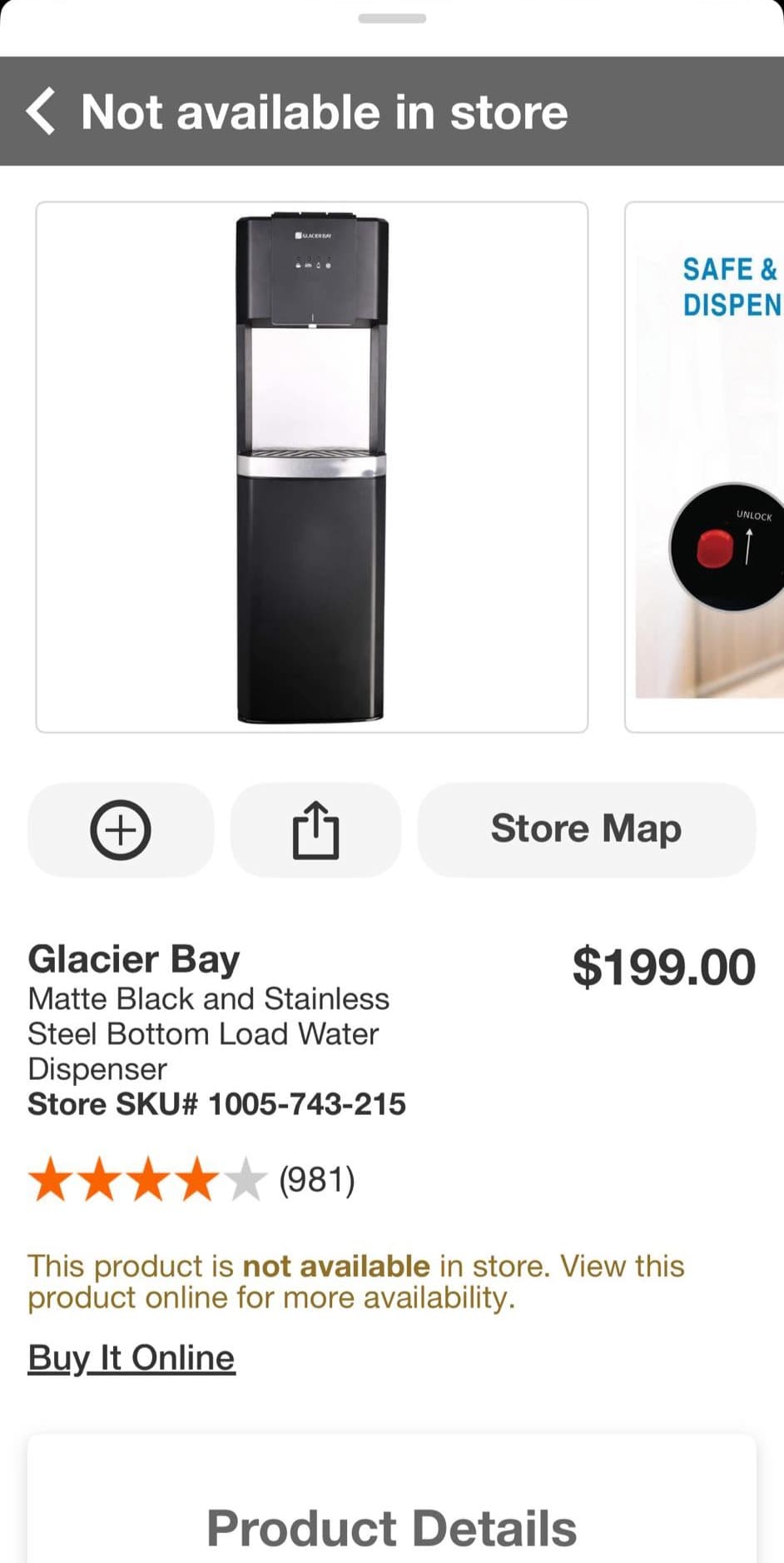
- The app shows a strange status. The Home Depot consumer app shows the item with an active price and a quantity, but with a status banner reading "Not available in store" or "Out of stock."
Each signal is weak by itself. A missing item may be sold out. A clearance sticker may be an earlier markdown. "Not available in store" may mean the item was never set up at that location.
When two or three signals point to the same item, verify it.
The "Not available in store" or "Out of stock" banner is one of the strongest secondary signals, and it shows up across categories with the same wording. On an item that still shows an active price, it can point to stock hiding on the high overhead shelves. It can also mean something duller, like an item that is inactive but still selling at full price — which is why it needs other signals next to it.
Do not treat the signal stack as proof. Treat it as a filter for deciding what deserves a verification scan.
The verification scan
The only way to know whether something is a penny is to scan the product itself. Do not scan the tag.
- Take one item to self-checkout. Pull one off the shelf, walk it to self-checkout, and scan the barcode on the package.
- See what the register says. If it rings up at $0.01, it is a penny. Buy that one. Then go back and quietly collect the rest, if there are more. If it rings up at any other price, put it back. Tell the self-checkout attendant you were checking the price.
No harm done. You have not committed to anything. The scan was the test.
If only the overhead has stock and the home shelf is empty, you can ask an associate to look it up on the First Phone or pull it down. That path is safe for non-penny clearance items. For suspected pennies, asking can cost you the find, so save it for items you truly cannot reach yourself. (Why asking is risky is in Where pulled penny items go; when you have no choice but to ask, see The exception: when you can't reach it.)
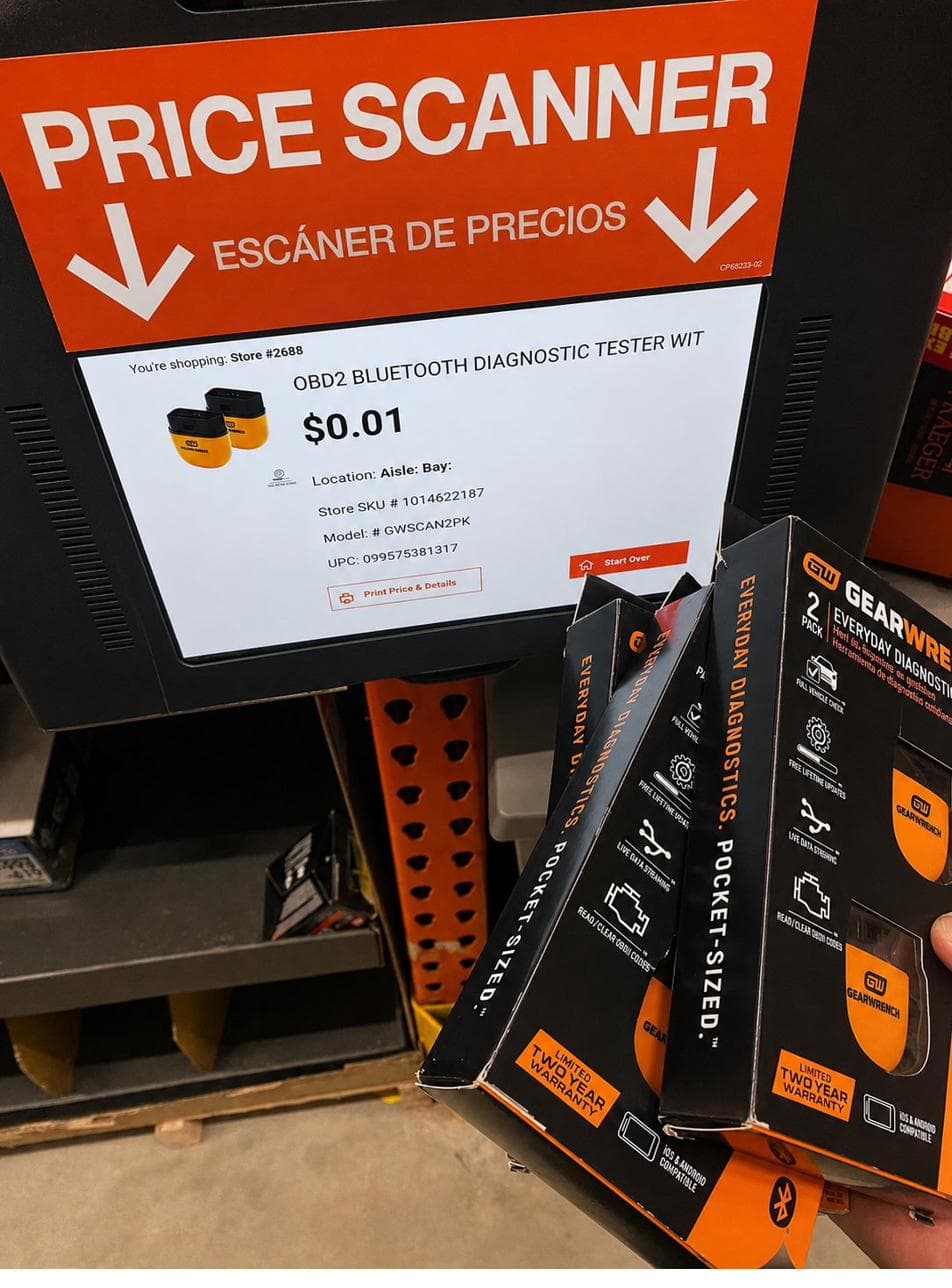
Some stores have an in-aisle self-service price scanner. That mostly comes down to state law: a few states, like Massachusetts, require stores to provide price-check scanners if they don't put a price sticker on every item, so scanners are common there and rare almost everywhere else. If your store has one, it is another way to verify without going to the register.
Tags, barcodes, and rookie mistakes
Two recognition skills prevent most beginner mistakes: reading a clearance tag correctly, and scanning the right barcode at self-checkout.
Real clearance tags have a date and a "WAS" price
Real Home Depot clearance tags have two marks that promotional yellow labels do not have: a date and a "WAS" price. Both formats, older and newer, share those features.
The older format does not have the word "Clearance" printed on it at all. The newer one does.
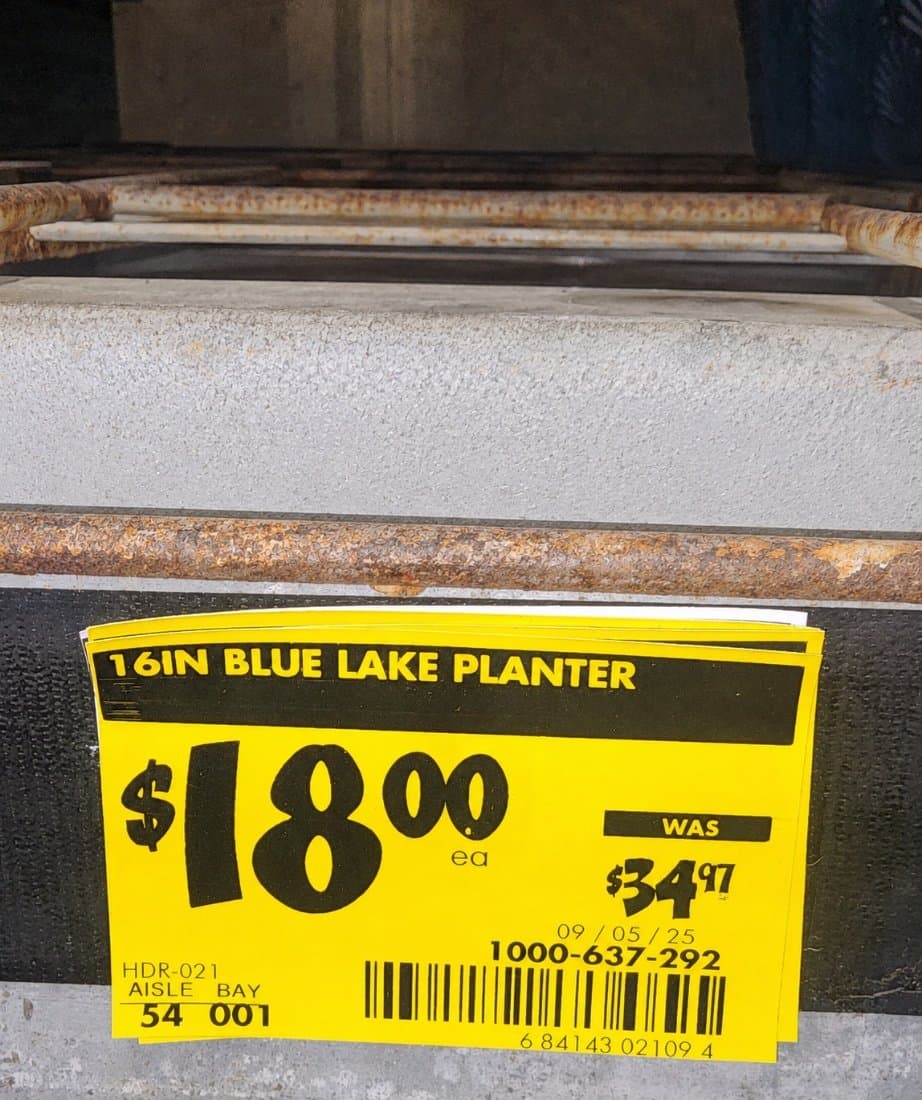
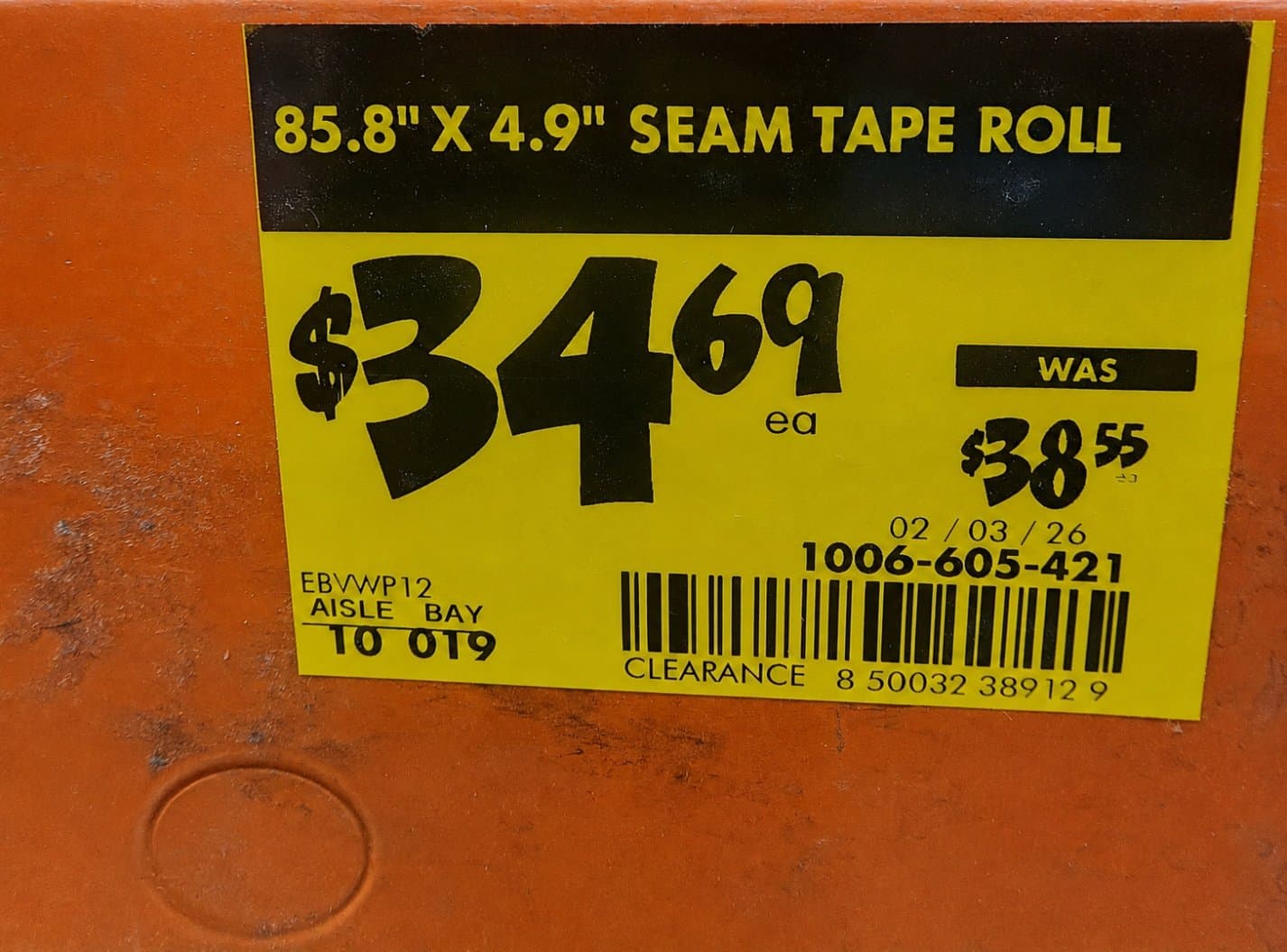
A yellow label without a date and "WAS" price is not clearance
Yellow does not always mean clearance. Home Depot uses yellow on regular promotional labels too. The mix-up can also run the other way: when a store runs out of white label stock, regular-price labels may print on yellow stock.
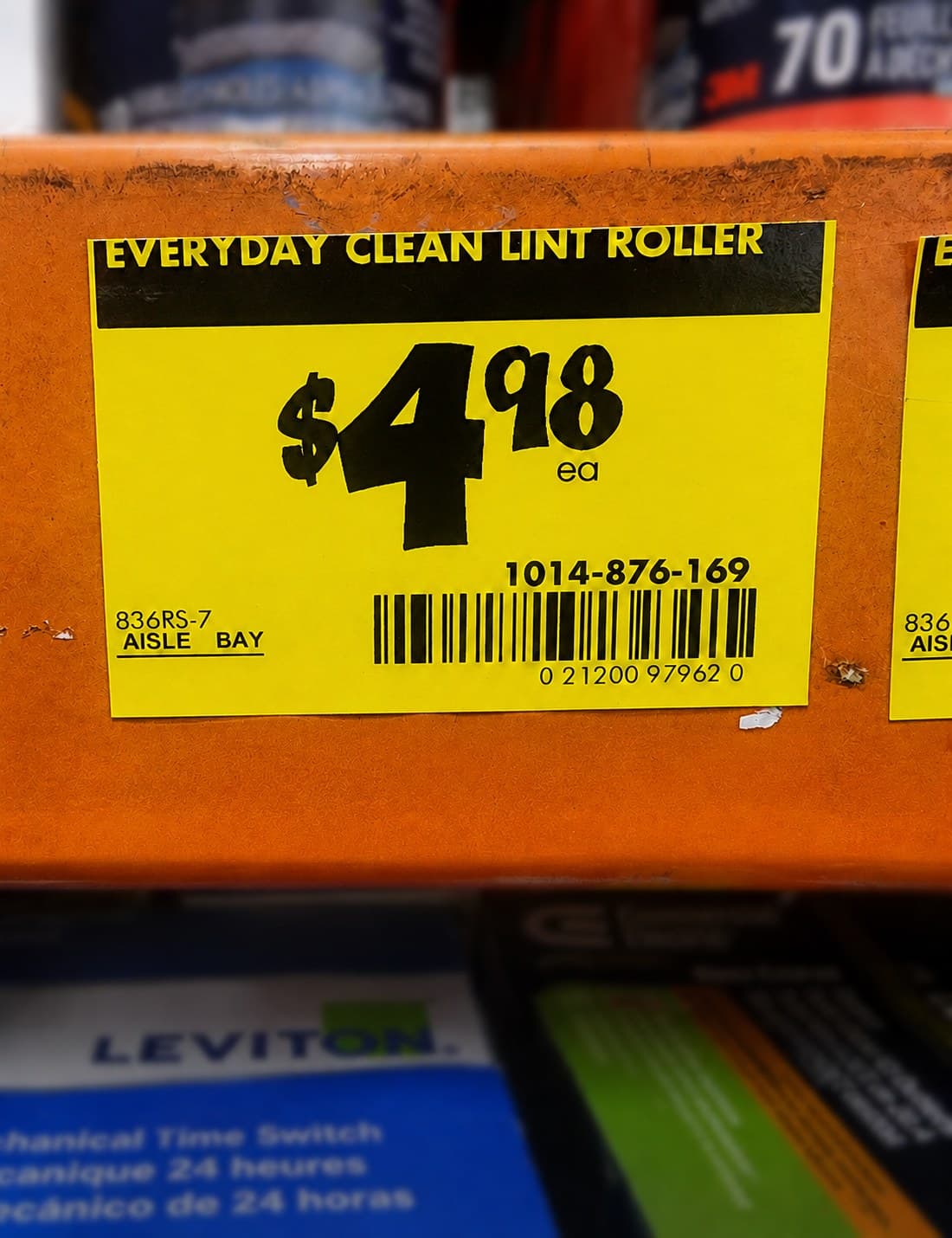
The barcode on the tag is the shelf-tag barcode. Scan the package
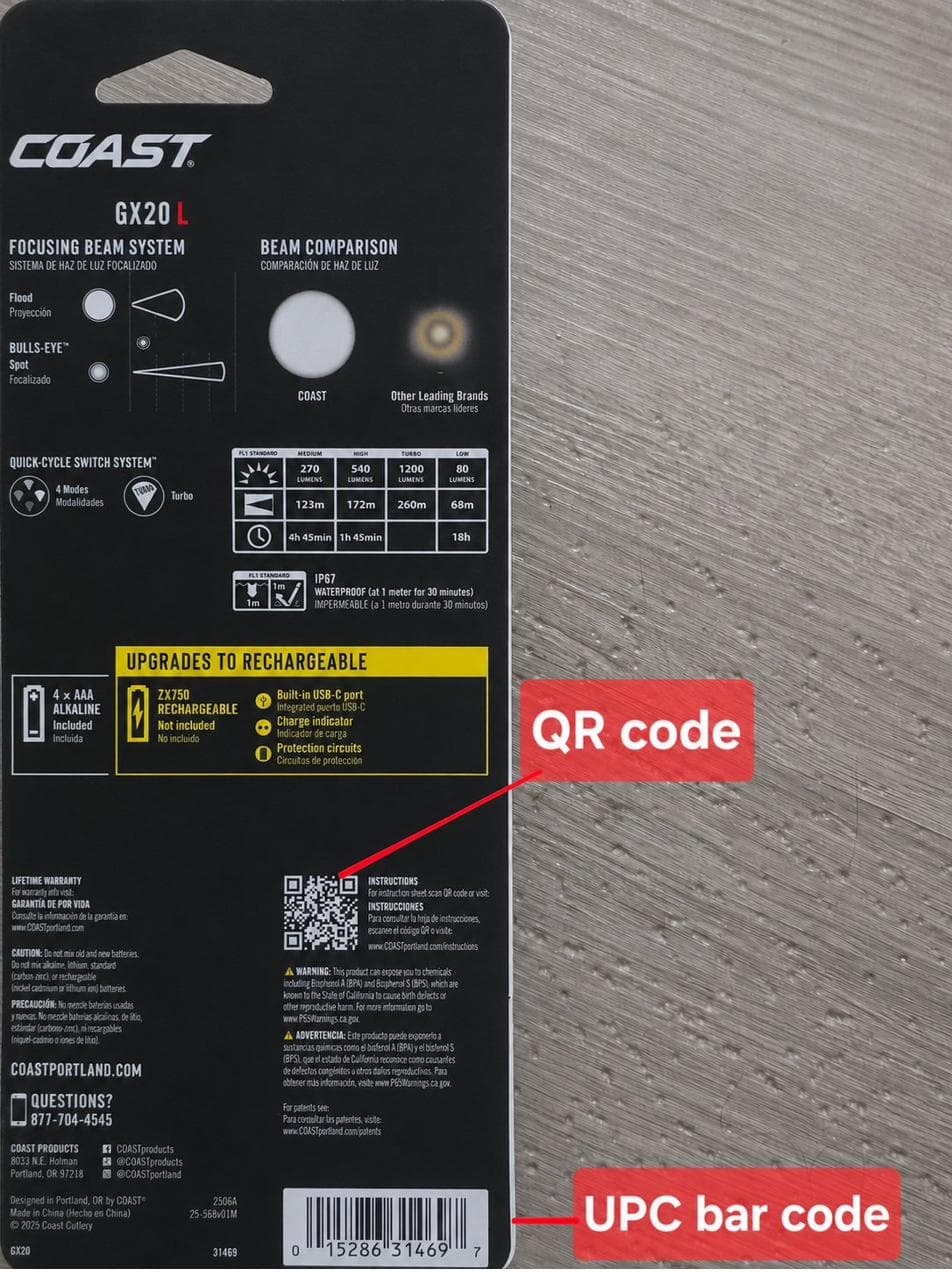
When the box has more than one barcode, only one is the UPC. Compare the digits printed under each barcode against the UPC number in the Home Depot app. The right barcode will match.
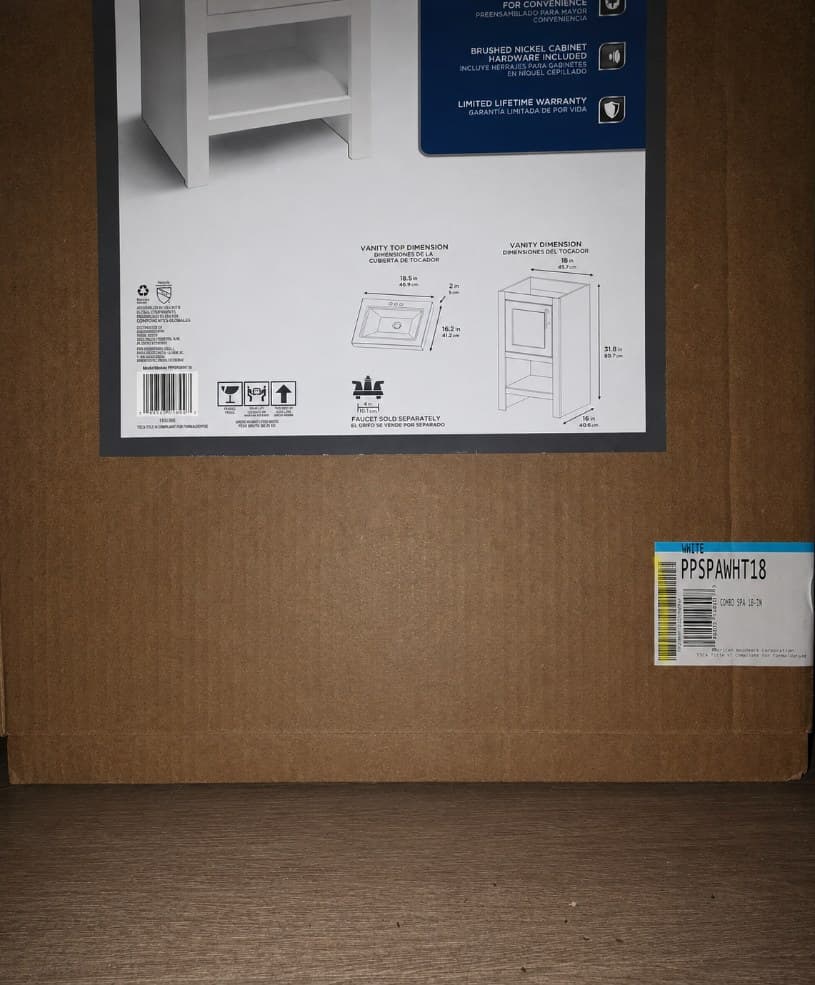
Cover the QR code with your thumb
Some boxes have a QR code near the UPC. If the scanner reads the QR code instead of the UPC, the register may trigger an associate-assist popup and cost you the opportunity.
Some clearance tags print on white paper
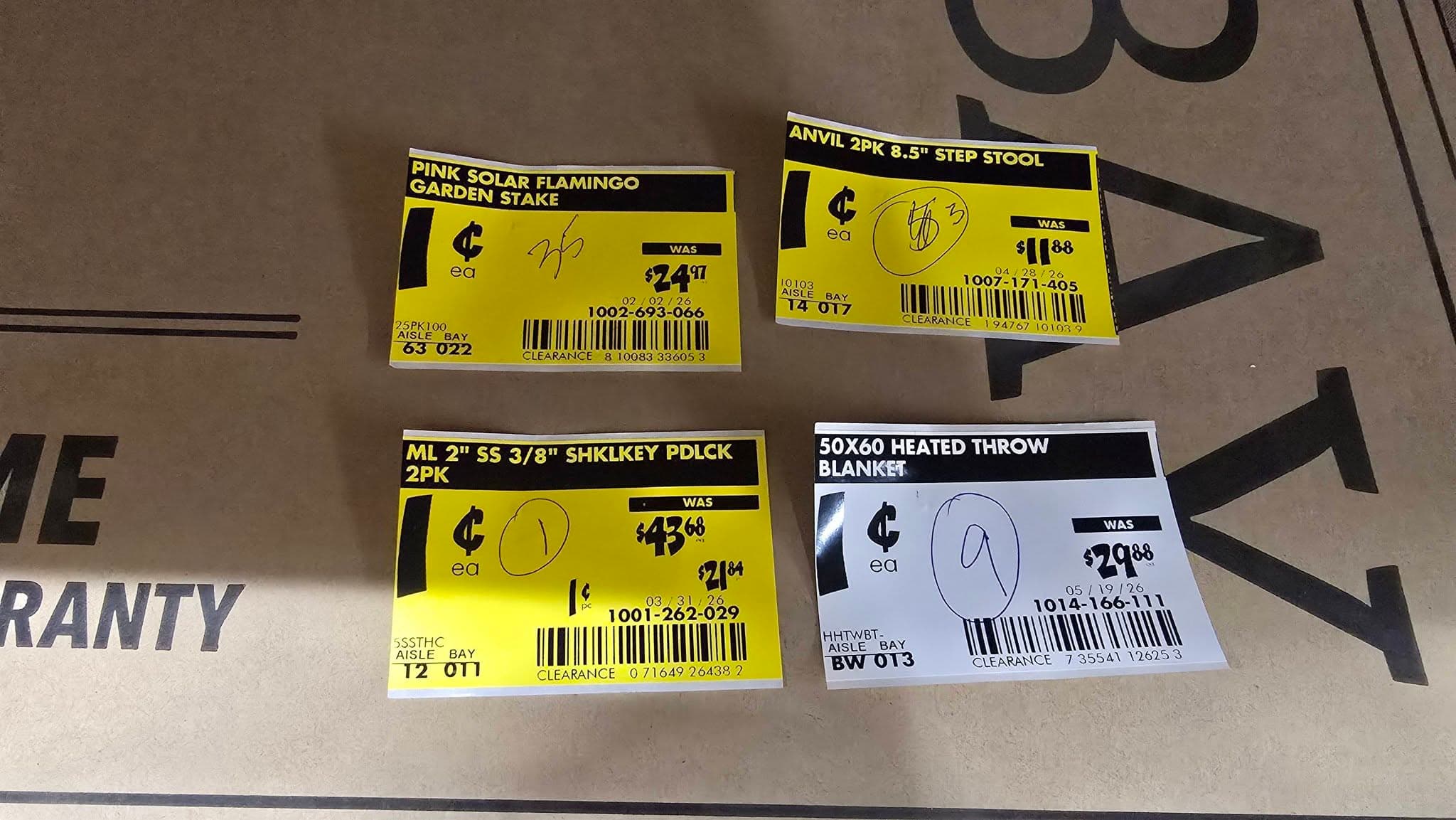
Most clearance tags are yellow, but white clearance tags exist.
When a store runs out of yellow label stock, it may print clearance tags on plain white stock. Pull crews can miss those tags because they do not look like normal clearance.
If a white tag says "CLEARANCE" and shows a "WAS" price, treat it like a yellow clearance tag.
The price ending is not a calendar
The big rule: watch the date, not the price ending. In 2026, the last two digits on a clearance tag no longer tell you the markdown stage. The date on the tag and the "WAS" price tell you more.
Then: the ending used to follow a ladder — $X.97, then .06 / .04, then .03 / .02, then the $0.01 penny.
Now: that ladder is broken. The same ending can mean different things at different stores, on different items, in different weeks.
Why the ending stopped working: each store runs its own clearance. Managers and departments move at different speeds, and the same item can be full price three miles away. There is no national schedule hiding in the last two digits. The date is stronger because it tells you when the clearance clock started.
The rough timing (a mental model, not a promise). Markdowns still step down in stages, and the drops get bigger as an item ages. Timing varies by store and department — seasonal items drop fast after a planned aisle reset, like swapping summer stock for fall; everyday items linger. Treat every number below as a rough range, not a schedule.
- First markdownNote the date. Usually too shallow to chase.
- Middle markdownWorth watching. Start stacking signals.
- Late markdownCheck often. Close to a pull. Verify by scan.
- PennyScan the package UPC to confirm.
Use these stages to decide what to watch, not to predict an exact date or price.
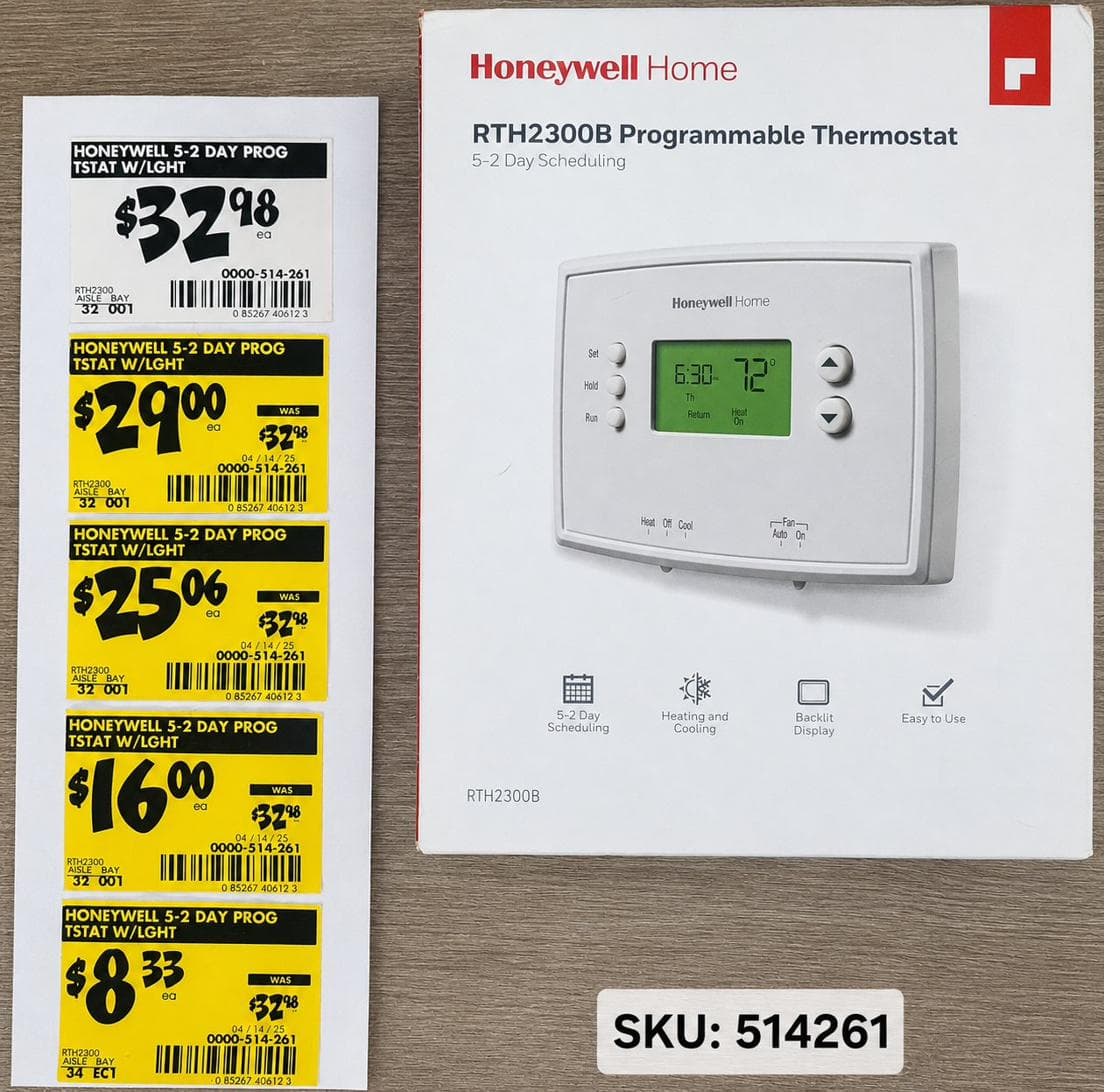
Proof it's real: one thermostat, five tags. One Honeywell thermostat, SKU 514261 (the store's internal item number), was photographed at five markdowns:
- $32.98 — first tag we caught. Ending: .98
- $29.00 — about 12% off. Ending: .00
- $25.06 — about 24% off the first tag. Ending: .06
- $16.00 — about 52% off the first tag. Ending: .00 again
- $8.33 — about 75% off the first tag. Ending: .33
Look at the endings: .98, .00, .06, .00, .33. They do not form a ladder. .00 repeats. .33 does not fit the old code.
Look at the trend: the price keeps falling, and the drops get bigger. That is the useful signal. The ending did not tell the story; the date and falling price did. (These percentages are for this one thermostat, measured from its first tag — not the general stage percentages listed above.)
A marker on the box isn't a green light
Sometimes you will see handwriting on a box — letters like "ZMA," a code, or a scribble. It is tempting to read that as "this one's a penny." It is not a guarantee.
Reading the First Phone
The handheld device associates use is called a First Phone. Its brand name is Zebra, so penny shoppers often use both names for the same device.
A First Phone lookup can show the item price, store quantity, aisle and bay location, and whether the item has a home shelf. It can also show deeper stock numbers: on hand, available for sale, and on order.
Here's what that screen looks like for a real penny item:
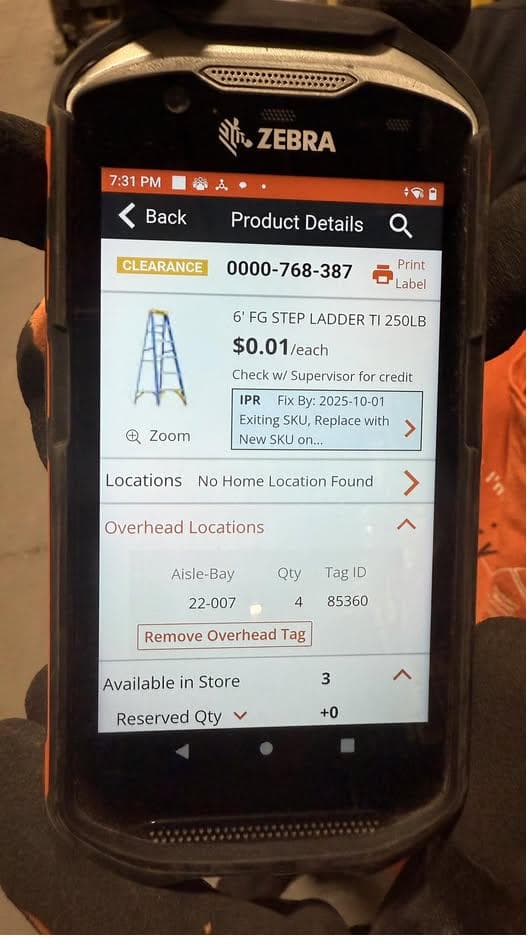
That screen shows the whole mess in one place: a $0.01 price, "No Home Location Found" (no home shelf), four units in an overhead bay, and three reportedly available in the store.
One more mark worth knowing: the "Exiting SKU" note near the top. That is the system flagging that the item is on its way out of Home Depot's lineup for good — exactly the note you would expect next to a penny price.
The system thinks the item exists, but it does not fully know where the item is. Whether you find it depends on how well the store has searched.
What the number on the screen actually means
The First Phone is the best system record in the store, but it is still a record, not reality.
"On hand" means the system believes the item is in the store. Zero on hand does not prove zero exist. A count may have been zeroed because no one could find the item during a store count.
The reverse can happen too: the device may show stock that is already gone, stolen, damaged, or sitting in Receiving, the store's back shipment area.
Use this table as the rule:
| What the First Phone shows | What the number could actually mean |
|---|---|
| 0 on hand | Some may still exist. They may be misplaced, overlooked, or zeroed out after a failed count. |
| 60 on hand (or 10, or 5) | Some or all may be gone, damaged, stolen, or already moved to Receiving. |
Treat the First Phone's number as a strong signal, not a fact.
The signal stack and verification scan still do the real work. The device is the most informed input, not the final answer.
The Minus One rule: why the consumer app differs
One app quirk matters: the consumer app often shows one less than the internal count associates see.
- When the consumer app says "1 available," the First Phone may show 2.
- When the consumer app says "0 / unavailable," the First Phone may show 1.
An item the app calls unavailable may still show one unit on the First Phone. Sometimes that is the unit that survived the pull.
Penny items vs. stop-sales
Beginners often think these are two versions of the same thing. They are not.
A penny item is a price. It scans, rings up at $0.01, and you can buy it — the register never stops it.
A stop-sale is the opposite: the register refuses the scan and no price comes back. That is the pop-up shown below, and it is the only time the register itself says no.
Penny item
- Register price:
- $0.01
- Register behavior:
- Designed to ring through normally when the product UPC is scanned.
- Does the register block it?:
- No. It scans and rings up at $0.01. A person could still decline to sell it (varies by store, employee, shift), but the register never stops it.
Stop-sale
- Register price:
- None. The scan returns no price at all, not even $0.00.
- Register behavior:
- Designed to abort the sale entirely; hardcoded register stop.
- Does the register block it?:
- Yes. This is the only register block. No price comes back, the scan is refused, and the associate is flagged to pull the item. No employee can override it.
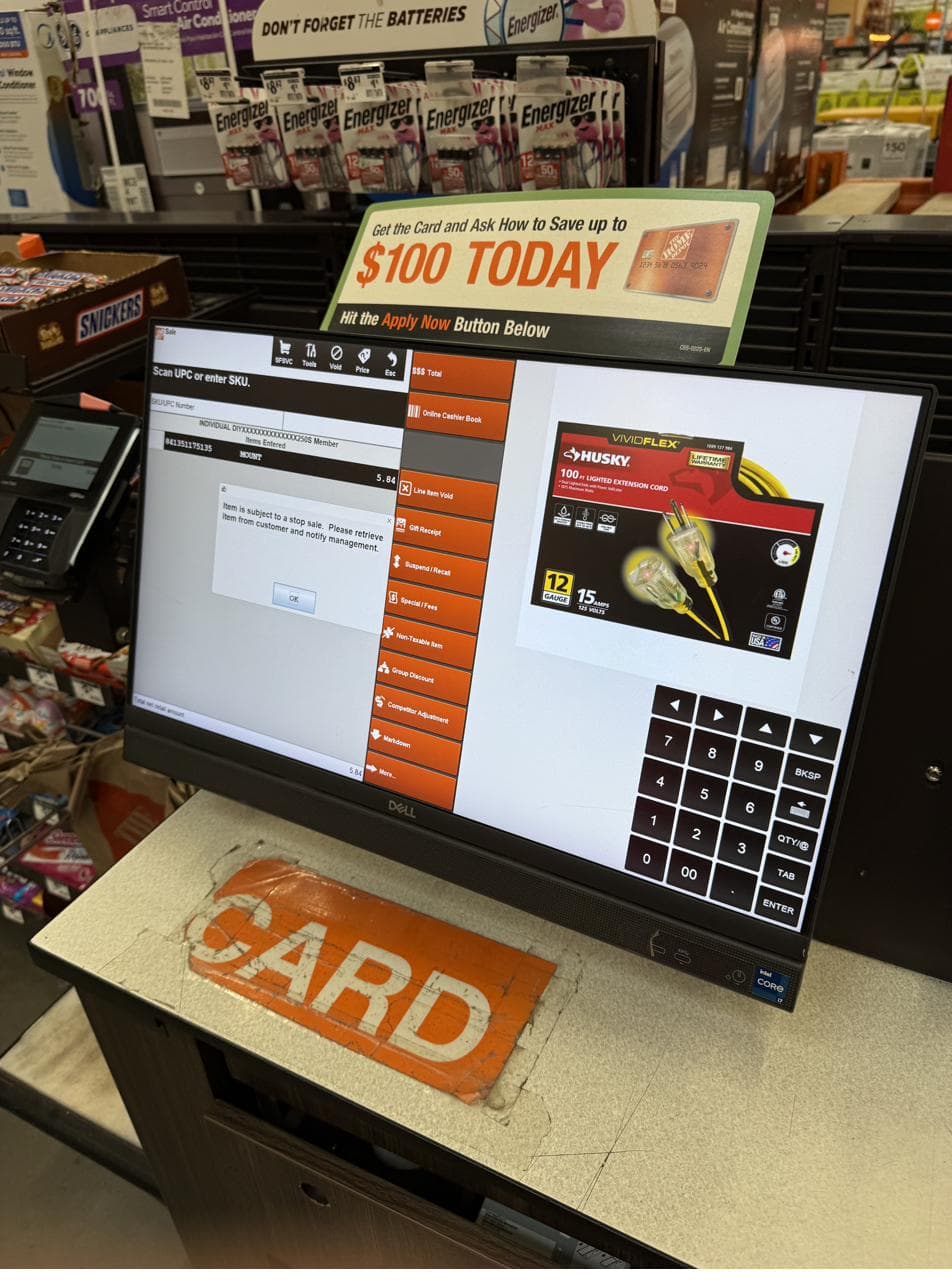
Both can feel like "you can't buy this," but they work differently.
A penny item refused by an associate is a discretion call. A stop-sale is the register itself refusing.
Keep those separate. A refused sale in one moment does not predict your odds on the next suspected penny at another store.
Where missed items hide
Once you know the First Phone count is only a signal, the next question is where missed items usually hide.
Check in this order:
- Overhead first. The high shelves above the regular stocking area are where most missed stock ends up. Items get put up there when a pallet comes in and nobody pulled them down to restock; items get pulled from the floor and stashed back up there during a reset.
- Mixed in with newer items. A penny-stage SKU sometimes gets shelved in the same spot as a newer replacement SKU, hidden by sheer visual similarity. Look behind and among the newer stock.
- The wrong place in the overhead. When an item's home location changes and the overhead does not get updated, the item sits in the old slot until someone notices.
- The aisle over. Sometimes, items are accidentally placed in a neighboring aisle.
Some suspected pennies are gone: stolen, damaged, moved, or lost behind shelving. You will not find every item the system suggests. That is normal.
What the overhead actually contains, in two photos
These two photos show the same SKU in the system and in the overhead:
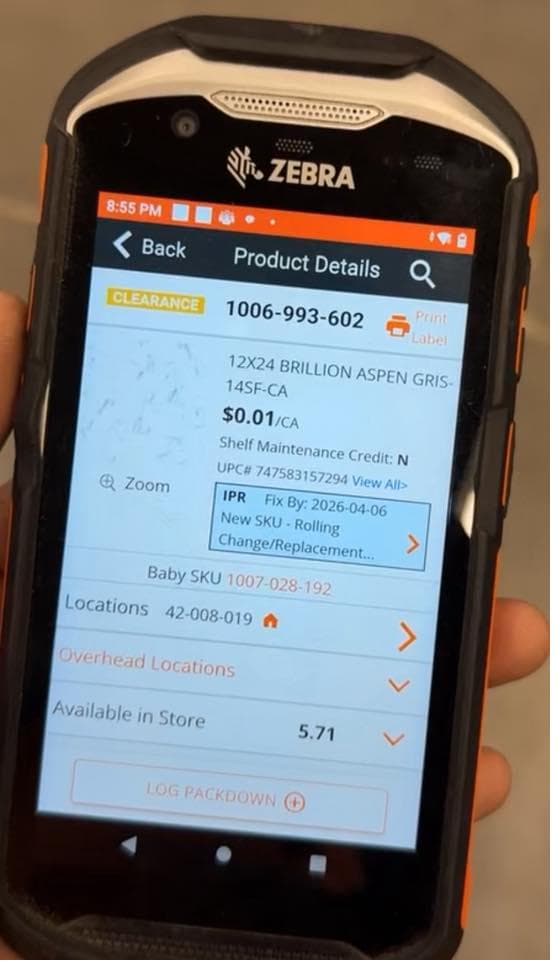
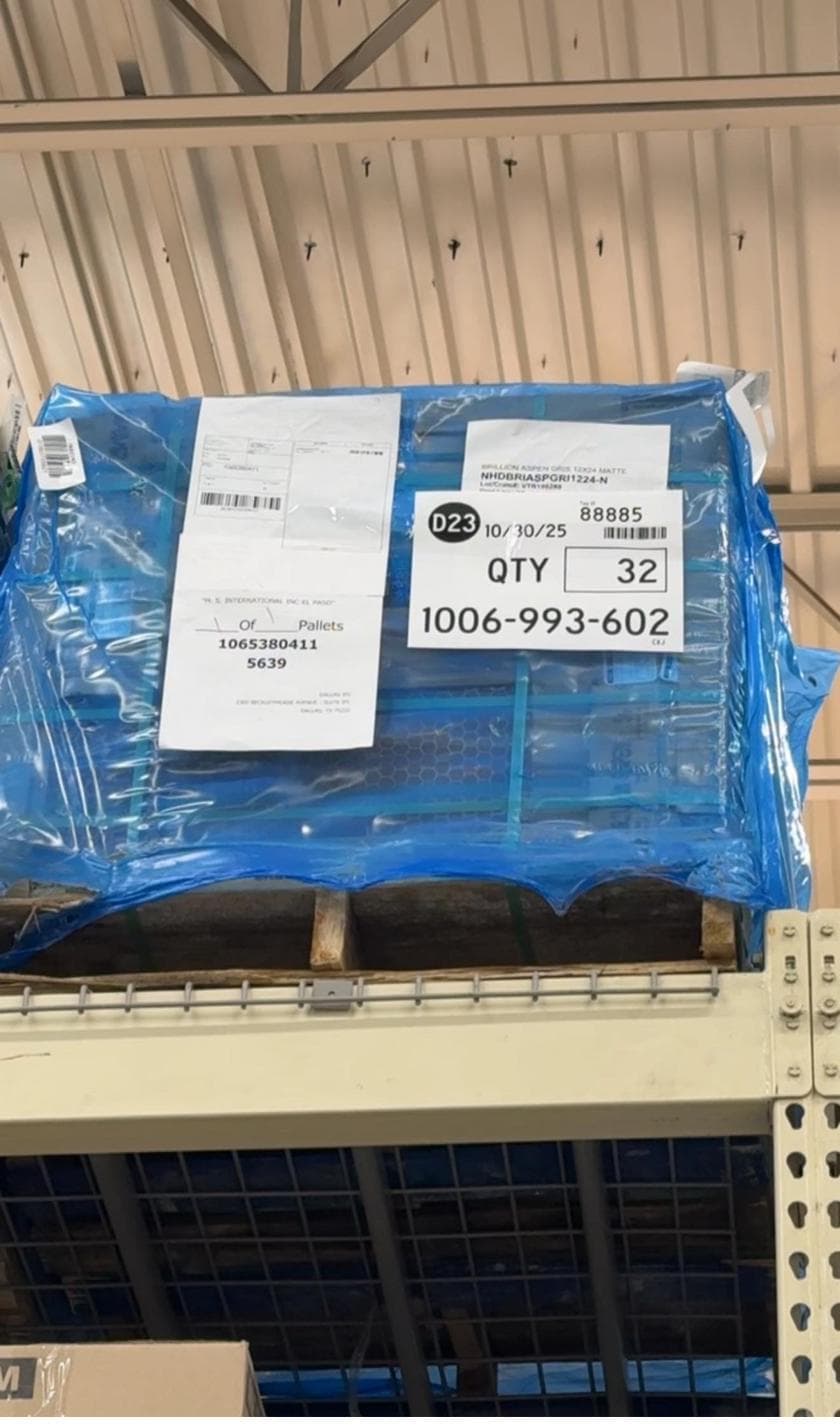
Two lessons in one set: penny items often live in the overhead, and the store's count is not always accurate.
When to ask an employee, and when not to
Employees should help with normal shopping questions. Suspected pennies are different because staff are supposed to remove identified penny items from the floor. When you ask about a suspected penny, you may be asking them to take it away.
Push for help on regular clearance. Stay quiet on pennies.
For regular clearance, do not take "it is not here" at face value. Check for yourself when the item should be on the shelf or in the overhead.
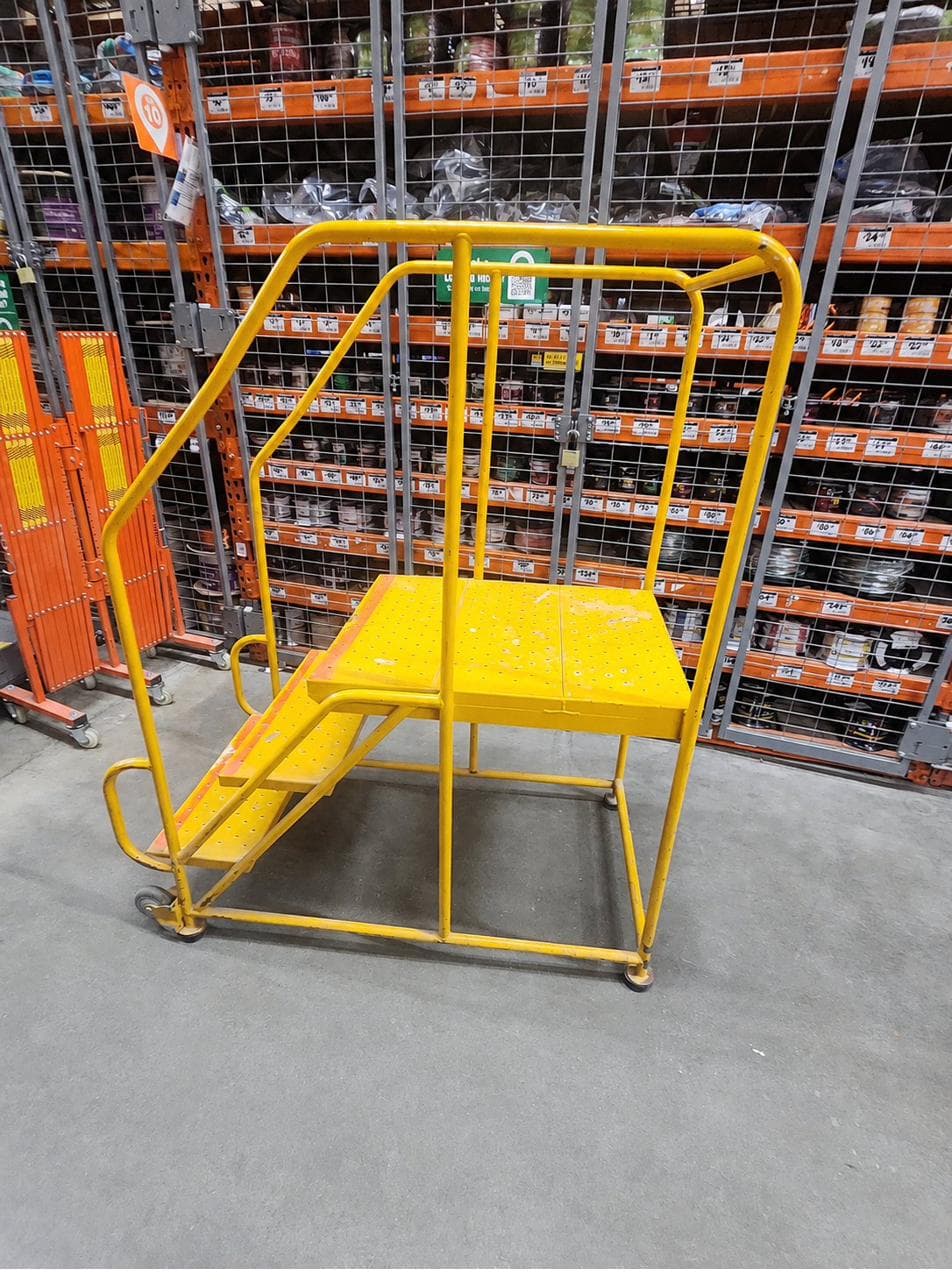
Yellow ladder, orange ladder
Overhead access in Home Depot stores comes from rolling ladders. The color tells you who's allowed to use it.
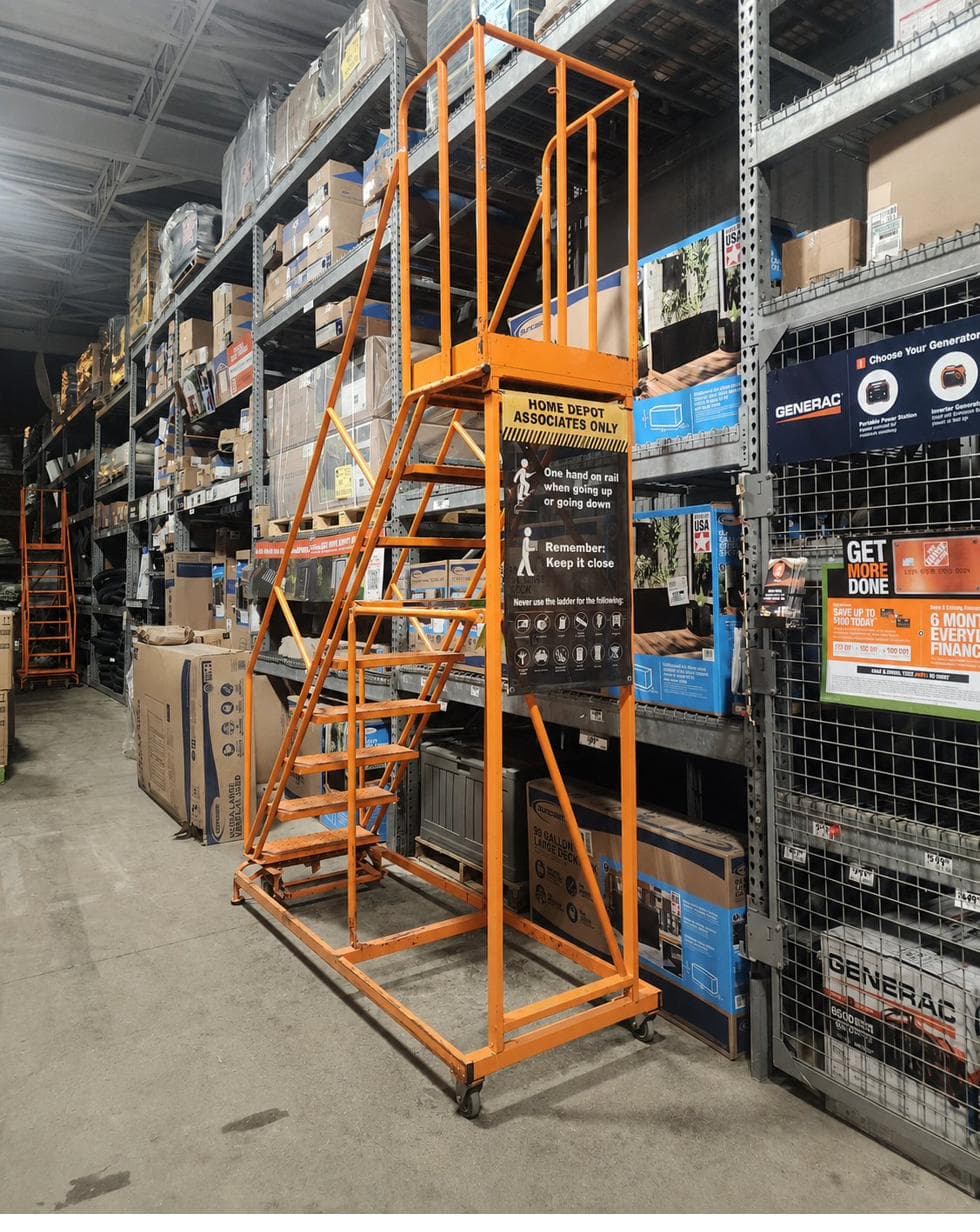
The exception: when you can't reach it
The "stay quiet on pennies" rule has one limit: reach. If a suspected penny sits higher than the yellow ladder goes, or only an orange ladder reaches it, or it is something heavy like a vanity that takes a pallet jack or a lift machine to bring down, you cannot get it yourself. If you don't ask, you don't get it — so this is the one time you ask an employee to bring down a suspected penny.
Go in with clear eyes about the risk. The employee may look the item up, see that it should have been pulled, and take it away — and once that happens, they will almost always refuse to sell it to you. This happens regularly, and there is no move that prevents it. Some finds are lost the moment you have to ask.
You can be a little choosy about which employee you approach, but do not expect to read people well. The one who seems strict sometimes turns out to be great, and the friendly one sometimes goes straight by the book. It is a numbers game: you win some, you lose some. Accept that before you ask, and the losses sting less.
One item or the whole stack
If the shelf holds several of the same suspected penny, you have a real choice: verify one first, or take all of them to the register at once.
One item is less awkward if you are wrong. But if it rings for a penny, the sale may alert staff — the system can flag a penny sale to an associate's handheld. Some stores act on that alert fast and pull the rest of the stock; others never act on it at all.
Taking all of them improves your chance of getting the whole find, but a full cart draws more attention at self-checkout. Neither choice is always right.
Take one, leave the rest
- Risk:
- If it is a penny, the sale may alert staff, and the remaining stock can get pulled before you make it back.
- Reward:
- Less awkward at the register if it is not a penny.
Take all at once
- Risk:
- Awkward return trip if it is not a penny.
- Reward:
- All items secured before the store can react to the penny sale.
The right call depends on how many of the item there are, how valuable each one is, your read of how attentive the store is at that moment, and how comfortable you are with putting items back if the scan fails.
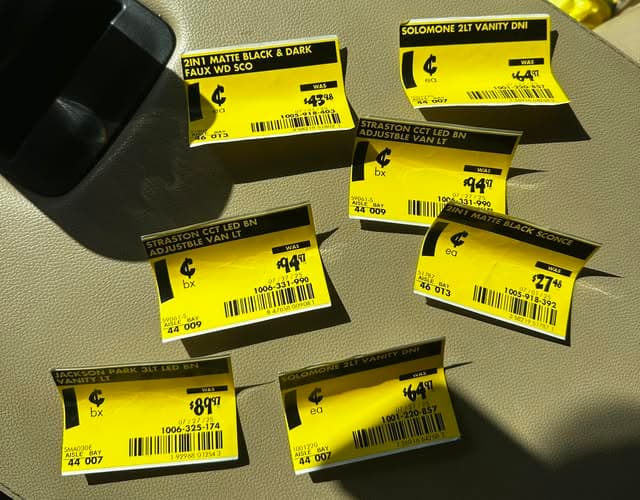
People do find clusters: multiple penny SKUs in the same aisle on the same date. Whole product groups often go to clearance together, so when one item pennies out, check the rest of its category before you leave the aisle. Here's a real cluster:
Same SKU, different UPC
Two terms matter here: the SKU is Home Depot's internal item number, and the UPC is the barcode printed on the package. Two boxes can share the same SKU while carrying different UPCs.
Sometimes a suspected penny has a near-twin: the same product, or a replacement that looks almost the same. Two boxes can share the same shelf spot and look nearly identical. The older UPC may scan for $0.01. The newer UPC may scan at full price.
If you are grabbing several of the same item, verify that every box carries the same UPC. You could be holding a mix of new and old UPCs, or two near-identical boxes (a brushed nickel faucet vs. a chrome one) with different codes.
Take the extra few seconds. It can save the whole checkout.
Where pulled penny items go
When staff find and pull a penny item, it usually goes to Receiving: the store's shipment area, off-limits to customers.
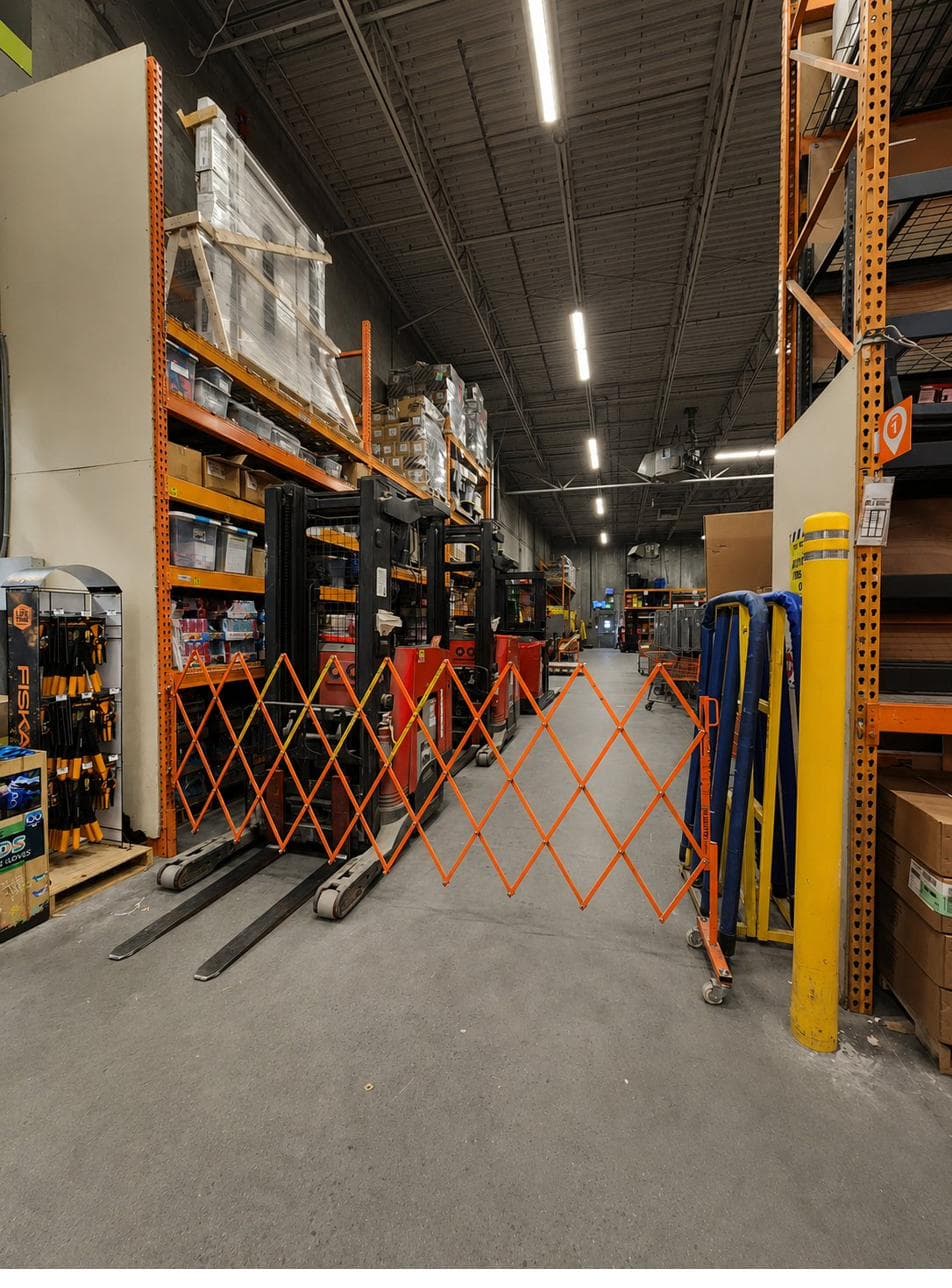
Once a penny item lands there, one of four things usually happens:
- Many items get destroyed in the store's trash compactor.
- Others get packed up and returned to the vendor for credit.
- Some get sent to companies that sell overstock.
- A smaller number get held aside for donation to a non-profit, at the store manager's discretion.
None of those paths involve selling the item to a customer at full price. By the time something has pennied out, it is supposed to be out of the store's active stock.
That is the reason behind the "do not ask employees about a penny" rule. Once you identify a suspected penny to staff, you may trigger the removal process.
Penny shopping exists because real stores are messy. Items get misplaced, counts go wrong, pulls get done halfway, schedules slip, and products resurface late. The gap between "should be pulled" and "actually pulled" is where penny items live.
Two rules about employee purchases
If employees can see markdowns first, why is anything left for customers? Two rules explain it.
- Employees cannot purchase penny items. The employee is supposed to remove the item, not buy it. Family and friends of employees are not allowed to purchase penny items either.
- Employees can buy regular clearance, but must wait 24 hours. The waiting period exists because employees see markdowns and price changes before customers do. The wait gives regular shoppers a fair shot at the item before staff can buy it.
So customers have a real opening: employees must wait on regular clearance, and they cannot buy pennies at all.
Your first store trip
There is no single correct method for penny shopping.
Some shoppers walk every aisle of one store. Some visit several stores looking for one category. Some focus on the aisles they know best. Some hunt one or two specific items.
Put the method to work:
Ethical Use Statement
This guide is for educational purposes only. PennyCentral does not encourage policy violations, employee confrontation, or misuse of retail systems. Always respect store employees and follow local store policies.